- Published on
Building AI Agents with DeepSeek and Model Context Protocol (MCP): A Practical Guide Using OpenAI’s Agentic SDK
- Authors

- Name
- aithemes.net
In this post, we explore how to integrate DeepSeek AI with the OpenAI Agentic SDK using the Model Context Protocol (MCP), showcasing a powerful and cost-efficient alternative to traditional LLM setups. By combining DeepSeek with emerging agent standards and public MCP servers, you can deploy autonomous agents with reduced cost and greater flexibility.
We’ll walk through:
- What Model Context Protocol (MCP) is and why it matters for agent interoperability
- How to connect OpenAI’s agentic SDK to DeepSeek instead of OpenAI models
- How to configure the setup to connect with live MCP servers
- A full Python script that you can run from the command line to demonstrate this integration
This guide illustrates the emerging potential of AI agents, the Model Context Protocol (MCP) as a foundational layer, and DeepSeek as a lower-cost yet capable LLM option for agentic workflows.
What is Model Context Protocol (MCP)?
The Model Context Protocol (MCP) is an open protocol for agent communication, allowing autonomous agents and tools to exchange structured messages in real-time. It decouples agents from model-specific APIs, creating an interoperable ecosystem where agents, tools, and orchestrators can speak a common language. You can read more about MCP in this post in my blog.
Model Context Protocol (MCP) supports streaming messages, multi-turn interactions, and standardized tool usage. As adoption grows, MCP is becoming a foundational layer for agent-native infrastructure—much like HTTP is for the web.
To dive deeper into how the protocol works, visit the MCP documentation site.
Why Use DeepSeek with Agentic SDK?
The OpenAI Agentic SDK provides a powerful framework for building tool-using agents. While it’s optimized for OpenAI models, the SDK is flexible enough to integrate other LLM providers—like DeepSeek—via custom clients.
Why this matters:
- Cost: DeepSeek’s pricing is significantly lower than GPT-4, enabling broader experimentation.
- Performance: DeepSeek’s models are competitive in code, reasoning, and multi-turn dialogues.
- Flexibility: Swapping providers lets you optimize for budget and use case.
In this setup, we’ll override the default OpenAI client and route requests to DeepSeek via its OpenAI-compatible API. Deepseek-chat, the LLM model from DeepSeek AI, is designed for conversational AI applications, offering strong performance in multi-turn dialogue and code generation, making it suitable for agentic workflows.
Setting Up the Integration
The Model Context Protocol (MCP) servers used in this setup are:
- Filesystem MCP Server: A Node.js server implementing Model Context Protocol (MCP) for filesystem operations.
- Git MCP Server: A Model Context Protocol server for Git repository interaction and automation. This server provides tools to read, search, and manipulate Git repositories via Large Language Models.
To follow along, you’ll need:
- A DeepSeek API key — get it here
- Python 3.8+
- The
openai-agentsSDK:
python -m venv env
source env/bin/activate
pip install openai-agents
- The script below, saved as
agent_mcp_deepseek.py
You’ll also need:
uvxinstalled- Node.js and
npxinstalled
Python Script: Agent with Model Context Protocol (MCP) + DeepSeek
To run the script, use the following command:
python agent_mcp_deepseek.py --repo_path /path/to/your/repository
The following script connects to both Git and Filesystem MCP servers using MCPServerStdio, then runs an interactive agent session powered by DeepSeek. The user can ask questions about the file system or a Git repository, and the agent uses context from these servers to respond.
Key features:
- Dual Model Context Protocol (MCP) server integration: Git context via
uvx, filesystem context vianpx - Customizable base URL and model name for DeepSeek through env vars
- Interactive CLI loop: Ask questions like "What files changed in the last commit?" or "List biggest file in the folder"
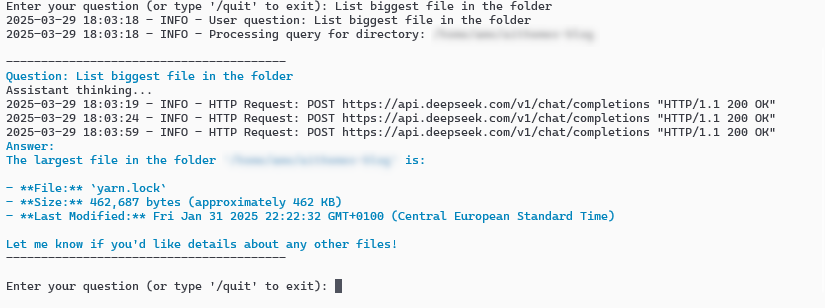
Example of the script execution output in the terminal
Below is the full script code implementing the integration described above.
#!/usr/bin/env python3

"""
This script runs a Model Context Protocol (MCP) client that interacts with MCP servers
to answer questions about a specified git repository and its filesystem.

It utilizes an AI model (via OpenAI API or compatible services like DeepSeek)
to generate responses based on the context provided by the MCP servers.

Usage:
    python agent_mcp_deepseek.py --repo_path <path_to_your_git_repo>

Prerequisites:
- Python 3.7+
- Required Python packages (install via pip, e.g., openai, agents)
- `uvx` tool installed (`pip install uvx`)
- `npx` tool installed (comes with Node.js/npm)
- Environment variable `DEEPSEEK_API_KEY` set with your API key.
"""

import os
import asyncio
import shutil
import argparse
import logging
from typing import List

from openai import AsyncOpenAI

from agents import Agent, Runner, set_tracing_disabled, OpenAIChatCompletionsModel
from agents.mcp import MCPServer, MCPServerStdio

# --- Configuration ---

# Configure logging
logging.basicConfig(
    level=logging.INFO,
    format='%(asctime)s - %(levelname)s - %(message)s',
    datefmt='%Y-%m-%d %H:%M:%S'
)

# AI Model Configuration (DeepSeek API or compatible)
BASE_URL = os.getenv("DEEPSEEK_BASE_URL", "https://api.deepseek.com/v1")
API_KEY = os.getenv("DEEPSEEK_API_KEY")
MODEL_NAME = os.getenv("DEEPSEEK_MODEL_NAME", "deepseek-chat")

# ANSI escape codes for colored console output
DARK_BLUE = "\033[34m"
RESET = "\033[0m"

# --- Pre-run Checks ---

# Validate essential configuration
if not API_KEY:
    raise ValueError(
        "API key is missing. Please set the DEEPSEEK_API_KEY environment variable."
    )
if not BASE_URL:
    logging.warning("DEEPSEEK_BASE_URL not set, using default: %s", BASE_URL)
if not MODEL_NAME:
    logging.warning("DEEPSEEK_MODEL_NAME not set, using default: %s", MODEL_NAME)

# Check for required external tools
if not shutil.which("uvx"):
    raise RuntimeError("uvx command not found. Please install it, e.g., `pip install uvx`.")
if not shutil.which("npx"):
    raise RuntimeError("npx command not found. Please ensure Node.js and npm/npx are installed and in your system's PATH.")

# --- Core Logic ---

async def run_agent_query(
    mcp_servers: List[MCPServer],
    directory_path: str,
    user_query: str
) -> None:
    """Runs the AI agent to answer a specific query about the repository/filesystem.

    Args:
        mcp_servers: A list of active MCP server instances.
        directory_path: The path to the target git repository and filesystem root.
        user_query: The question asked by the user.
    """
    logging.info(f"Processing query for directory: {directory_path}")

    # Initialize the AI client
    client = AsyncOpenAI(base_url=BASE_URL, api_key=API_KEY)

    # Disable agent tracing for cleaner output in this interactive tool
    set_tracing_disabled(disabled=True)

    # Create the AI agent instance
    agent = Agent(
        name="Assistant",
        instructions=(
            f"You answer questions about the git repository and filesystem located at "
            f"'{directory_path}'. Use this path for context when interacting with tools."
        ),
        mcp_servers=mcp_servers,
        model=OpenAIChatCompletionsModel(model=MODEL_NAME, openai_client=client),
    )

    # Run the agent with the user's query
    print("\n" + "-" * 40)
    print(f"{DARK_BLUE}Question: {user_query}{RESET}")
    print("Assistant thinking...")
    try:
        result = await Runner.run(starting_agent=agent, input=user_query)
        print(f"{DARK_BLUE}Answer:\n{result.final_output}{RESET}")
    except Exception as e:
        logging.error(f"Error during agent execution: {e}", exc_info=True)
        print(f"Sorry, an error occurred while processing your request: {e}")
    finally:
        print("-" * 40 + "\n")


async def main() -> None:
    """Sets up MCP servers and handles the interactive user query loop.

    Parses command-line arguments for the repository path, starts the Git and
    Filesystem MCP servers, and then enters a loop to accept user questions,
    running the agent for each query until the user quits.
    """
    parser = argparse.ArgumentParser(
        description="Run an AI assistant powered by Model Context Protocol (MCP) servers to query a git repository."
    )
    parser.add_argument(
        "--repo_path",
        type=str,
        required=True,
        help="Path to the target git repository."
    )
    args = parser.parse_args()

    directory_path = os.path.abspath(args.repo_path) # Use absolute path
    logging.info(f"Target repository path: {directory_path}")

    if not os.path.isdir(directory_path):
        raise FileNotFoundError(f"The specified repository path does not exist or is not a directory: {directory_path}")

    # Start MCP servers concurrently
    try:
        async with MCPServerStdio(
            name="Git Server (via uvx)",
            cache_tools_list=True, # Example: Cache tool list for performance
            params={"command": "uvx", "args": ["mcp-server-git"]},
            # Note: mcp-server-git typically doesn't need a path argument,
            # it operates on the repo where it's invoked or uses tool parameters.
        ) as git_server, MCPServerStdio(
            name="Filesystem Server (via npx)",
            params={
                "command": "npx",
                "args": ["-y", "@modelcontextprotocol/server-filesystem", directory_path],
            },
        ) as fs_server:
            logging.info("Model Context Protocol (MCP) servers (Git, Filesystem) started successfully.")
            servers = [git_server, fs_server]

            # Interactive query loop
            while True:
                try:
                    message = input("Enter your question (or type '/quit' to exit): ")
                except EOFError:
                    print("\nExiting.") # Handle Ctrl+D
                    break

                if message.strip().lower() == "/quit":
                    logging.info("'/quit' command received. Exiting.")
                    break
                if not message.strip():
                    continue # Ignore empty input

                logging.info(f"User question: {message}")
                await run_agent_query(servers, directory_path, message)

    except Exception as e:
        logging.critical(f"Failed to start or run Model Context Protocol (MCP) servers: {e}", exc_info=True)
        print(f"Critical error: {e}. Exiting.")
    finally:
        logging.info("Model Context Protocol (MCP) toolkit finished.")


if __name__ == "__main__":
    logging.info("Starting Model Context Protocol (MCP) toolkit...")
    try:
        asyncio.run(main())
    except KeyboardInterrupt:
        print("\nInterrupted by user. Exiting.")
        logging.info("Process interrupted by user (KeyboardInterrupt).")
    except (ValueError, RuntimeError, FileNotFoundError) as e:
        logging.error(f"Initialization failed: {e}")
        print(f"Error: {e}")
        # Exit with error code if setup fails
        exit(1)
Key Takeaways
- The Model Context Protocol (MCP) decouples agents from models and enables flexible, real-time tool communication across heterogeneous systems.
- The Agentic SDK is not limited to OpenAI — with small changes, you can run it on DeepSeek or any OpenAI-compatible model.
- This setup reduces cost while maintaining agent capability.
- With tools like
uvxandnpx, you can compose a full agent toolkit using public Model Context Protocol (MCP) tools and an open protocol stack.
This script demonstrates the early promise of combining standardized communication (Model Context Protocol (MCP)) with affordable intelligence (DeepSeek) to build practical, powerful AI agents.
- As the Model Context Protocol (MCP) ecosystem evolves, an expanding set of protocol-compliant servers is expected—enabling agent access to databases, APIs, cloud resources, and enterprise systems.
- This open and composable infrastructure unlocks model-agnostic workflows and deeper automation capabilities.
- Just as HTTP underpins the modern web, Model Context Protocol (MCP) may serve as the core substrate for the emerging agent-native internet.
Enjoyed this post? Found it helpful? Feel free to leave a comment below to share your thoughts or ask questions. A GitHub account is required to join the discussion.
Keep reading
Related posts
Jan 19, 2025
0CommentsIntegrating DeepSeek AI with E2B Sandboxes: A Beginner's Guide to AI Workflows
A hands-on guide to setting up E2B sandboxes, integrating DeepSeek AI, and running Python-focused AI-powered workflows for data processing and visualization.
May 4, 2025
0CommentsComprehensive Tutorial: Transforming FastAPI APIs into Intelligent Tools with FastAPI-MCP
Discover how FastAPI-MCP seamlessly bridges the gap between your FastAPI APIs and AI agents. This comprehensive tutorial covers setup, security, deployment, and real-world use cases, empowering you to create intelligent applications with ease.
Apr 21, 2025
0CommentsMastering the OpenAI Agents Python SDK: Build Intelligent AI Workflows with Tools, Guardrails & Multi-Agent Coordination
An in-depth, step-by-step tutorial on the OpenAI Agents Python SDK, covering installation, tool integration, context management, guardrails, multi-agent orchestration, and tracing to build robust AI agent applications.
